The King of Fighter XII on PS3.

the-king-of-fighters-xii1

King of fighter has taken the next evolutionary step with a reworked gameplay, glorious high-resolution 2D graphics, and silky smooth animation. its now been nearly half a decade since The King of fighter was last seen, and The King of fighter XII has arrives just in time to celebrate the franchise’s 15th anniversary.  The fighting game gurus have put the final touches on the Playstation3 release of The King Of Fighter XII.

The game will be available at retail today. July 28th, to the North American market first. The game will release in Asia and Europe later. Now you can battle head to head via Playstation Network to engage players all over the world. There is also a Playstation3 exclusive Clan mode for KOF XII players. A unique feature that allows players with a common goal to band together as a members-only club in order to create the most dominant online Clan possible. There is also an exclusive theme featuring sultry female fighters Elizabeth and Mature for PS3 players.

For those who are not familiar with the KOF series, there is a unique history. In 1994, characters from classic Neo Geo series including Fatal Fury, Art of Fighting, and Ikari Warriors were brought together to create a unique and revolutionary three-on-three fighting game known simply as The King Of fighter ‘94 and for the next decade KOF becomes the most beloved fighting game franchises ever.

EVO Fighting Game Championships 2009

EVO is the world’s largest and longest fighting game tournament and this year it was bigger than ever. There were 1000 Die-Hard players alone, which positively exploded EVO’s overall attendance. There were endless waves of people making their way through the conventional hall. it’s an event that truly brings the world community  together.  Capcom setup shop and showed off the latest builds of Marvel vs. Capcom 2 for Playstation network. Street Fighter 4 was definitely the main event, but Street Fighter 3: third strike, Super Street fighter 2 HD Remix and Capcom 2 vs. Marvel, alnog with Soulcalibour 4 and Guilty Gear XX: Accent Core were also there. It was a great and most enjoyable event. There were a lots of titles and latest stuff. You can find more detail here.

Evo 2009 concludes with Daigo Umehara defeating Justin Wong in Street Fighter IV.

Multiplayer Bluetooth-Enabled games for iPhone


iphone3

You can play two-player games using the Bluetooth of your iPhone. The iPhone/iPod 3.0 OS allow third party games and applications to use device’s Bluetooth for two-player games. Bluetooth-Enabled iPhone games are easy to play because there is no Wi-Fi access points or internet connectivity required. You just need two device to start the fun. There are several games that support multiplayer gameplay over Bluetooth. You can find the list of games that support multiplayer game over Bluetooth here.

How to open a CHM file through your C# application.

This simple tutorial will guide you, how to use a CHM help file with your Microsoft Visual C# projects or even small applications. To use a CHM help manual for your application, you need to first create a CHM help file for your project. After Creating your CHM file, you need to link it thorough your C# application. Let me show you how you can open it from your C# application.

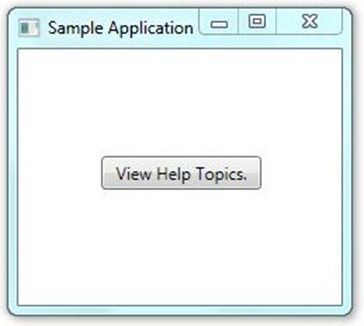
tutorial sample window

Assuming that you all know how to start a new project on visual studio, I skip all those steps. As you can see above there is simple windows application contains only a single button. Now to open a CHM file by clicking on the “View Help Topics” Button, you have to write a single line code only. Double click on the “View Help Topics” Button and write the code below inside the scope of Button1_Click function.

System.Diagnostics.Process.Start (Application.StartupPath + "\\Help Document.chm");

After writing this code it will look like this

private void button1_Click(object sender, RoutedEventArgs e)

{

System.Diagnostics.Process.Start(Application.StartupPath + \\Help Document.chm);

}

Make sure your CHM file is in your application folder. Now Debug your application and test it. You can also open any other file or application using the code above through your C# application. Hope you find it helpful. Please feel free to ask anything and do comment.

How to create a CHM Help file for your Software applications.

Creating a help manual for your application makes it easy for user of your application to understand it and use it properly without any external help. Now as we are talking about the help files, Compiled HTML help is a best solution. With Compiled HTML you can create your own eBook or a user manual for your applications.

CHM files are some-what a set of Html type web pages which has a table of content that are hyperlinked. So, lets talk on how you create your own CHM help file or an eBook etc. The steps are as follow:

To create your CHM file you need to have Microsoft Office Word.

Step # 1.

First Create your help document on Microsoft Office Word. It is like creating a normal document. Create Headings for the topics of your file and then add your content for each heading or you can add sub headings. To give a clear idea I have created a sample document in which I use three main headings and two sub headings for each main heading, see picture below.

tutorial word

Step # 2:

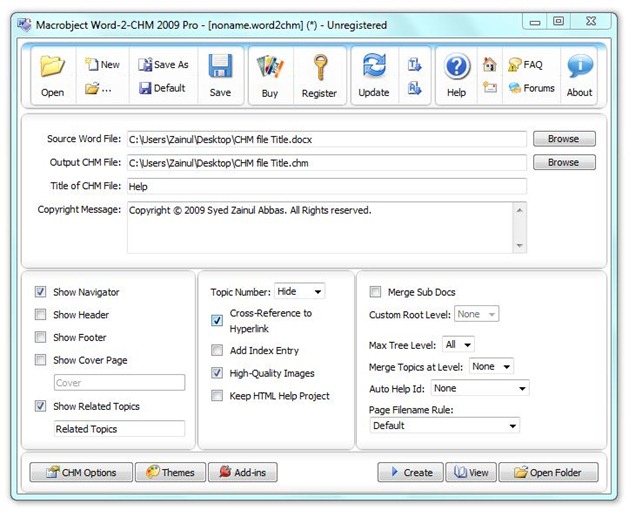
Now as you done creating your word document, you have to convert it to a CHM file. To convert it from word file to CHM file you need a DOC to CHM converter, which is easily available on the web. I am using Macrobject’s Word-To-CHM converter to demonstrate you how it would be done. Now let me take the above document and convert it to CHM using the converter.

tutorial convertor

Complete all required fields and click convert. You will find a yellow question mark icon file, on the destination folder you have given for output CHM file, see below.

chmIcon

Step # 3

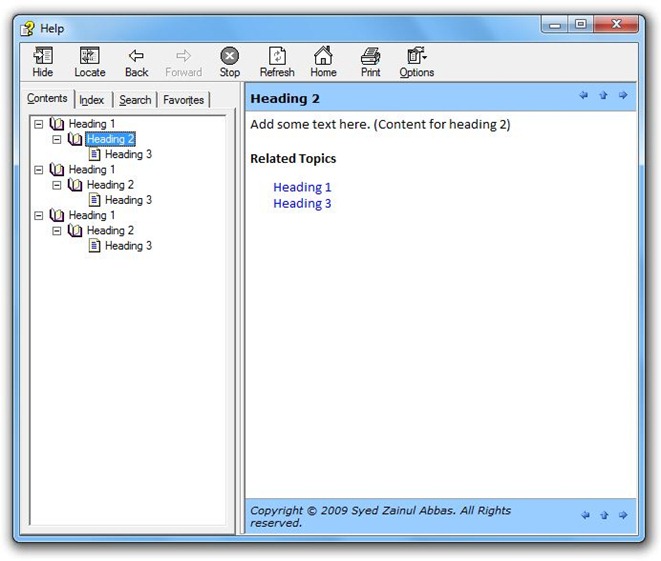
Use the converted CHM file wherever you want, for example as a user manual for your application.

tutorial chm

I hope you will find this quick tutorial helpful. Please do comment if you need any help.

Download Word-To-CHM converter here.